Understanding the Lifecycle Methods of Stateful Widgets in Flutter
In Flutter, stateful widgets create dynamic user interfaces that can change over time. Unlike stateless widgets, stateful widgets can update their state based on user interactions or other events. Understanding how stateful widgets work, especially their lifecycle methods, is important to ensure your app runs smoothly. In this article, we'll review the main lifecycle methods of stateful widgets in Flutter, explain each one's function, and show you when to use them.
Lifecycle Methods of Stateful Widgets
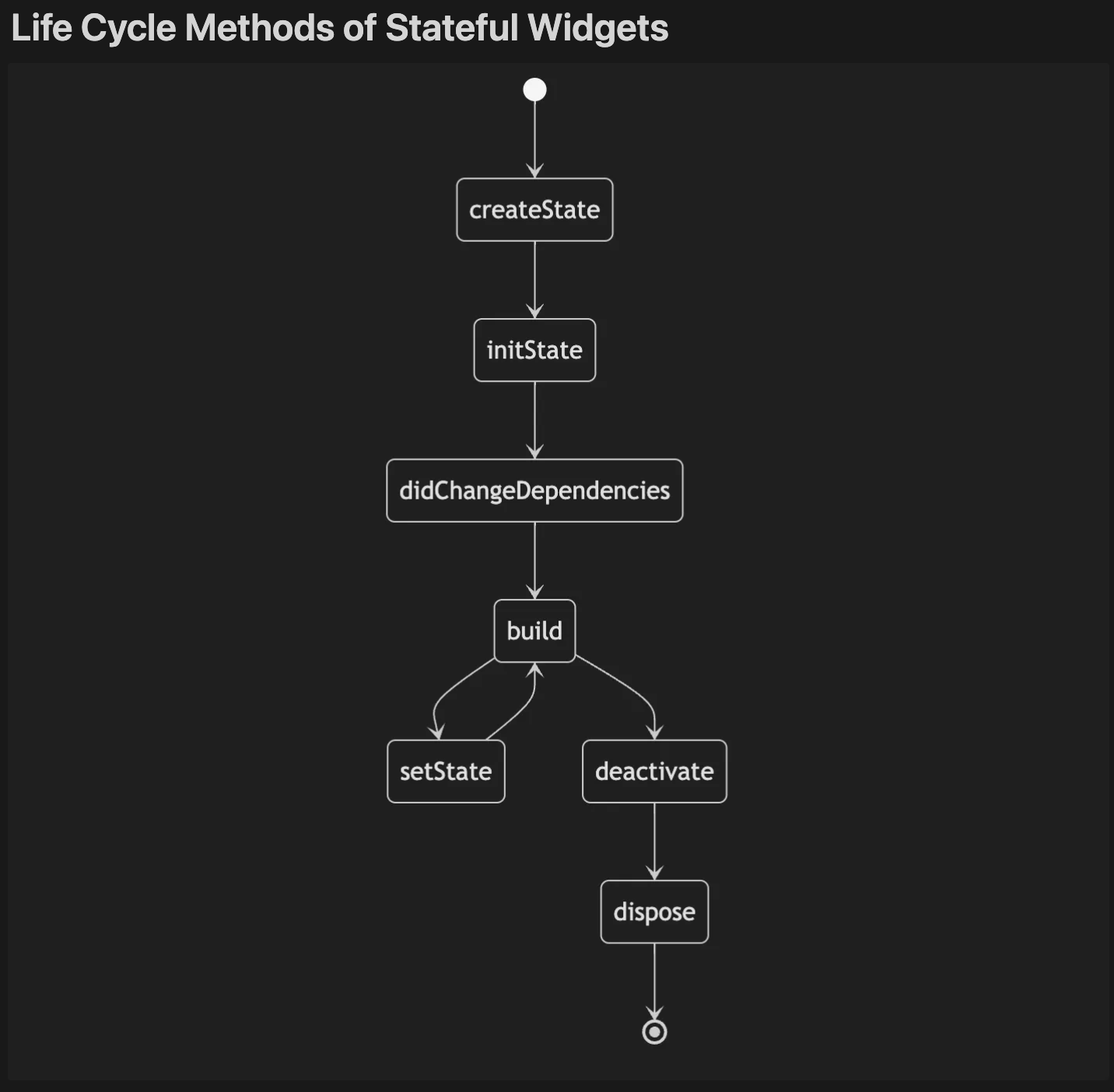
Stateful widgets go through a series of lifecycle stages during their existence. These stages are managed through lifecycle methods, which are called in a specific order. Let's explore the most commonly used lifecycle methods.
1. createState()
When you create a stateful widget, the createState() method is called first. It is responsible for creating the mutable state for the widget. This is where you define the state class that will hold the data or variables that will change during the widget's lifecycle.
@override
State<MyWidget> createState() => _MyWidgetState();
2. initState()
The initState() method is called right after the state for a widget is created, but before it is added to the screen.
It's a good place to set up anything that only needs to happen once, like initializing variables or loading data from a server.
This method ensures that your widget is ready before it starts building its UI.
@override
void initState() {
  super.initState();
  // Initialization code
}
Use case: Perfect for one-time setup like initializing data or animations that should happen before the widget builds.
3. didChangeDependencies()
The didChangeDependencies() is called immediately after initState() and whenever the dependencies of the state object change
For example, if you are using an InheritedWidget or Provider, this method will be called when the inherited data is updated.
@override
void didChangeDependencies() {
  super.didChangeDependencies();
  // Handle any changes in dependencies
}
Use case: Useful when you need to respond to changes in dependencies (like data from a provider).
4. build()
The build() method is called whenever the widget's state changes.
It creates the widget's UI based on the current state.
Since it can be called many times, it's important to keep it efficient.
@override
Widget build(BuildContext context) {
  return Container(
    child: Text('Current State Counter Value: $counterValue'),
  );
}
5. setState()
While setState() is not technically a lifecycle method, it plays a key role in updating the state of a stateful widget.
Calling setState() triggers a rebuild of the widget, which re-executes the build() method and updates the UI based on the new state.
setState(() {
  counterValue++;
});
Use case: Use this method whenever the widget's state changes and you need the UI to reflect those changes.
6. deactivate()
The deactivate() method is called when the widget is temporarily removed from the widget tree, usually during a rebuild.
Unlike dispose(), which is called when the widget is permanently removed, deactivate() is for cleanup that needs to happen during temporary removals.
@override
void deactivate() {
  super.deactivate();
  // Clean up resources like unsubscribing from streams temporarily
  _myStreamSubscription?.pause();
}
Use case: Cleanup tasks before the widget is removed or when its state is no longer needed.
7. dispose()
The dispose() method is called when the stateful widget is permanently removed from the widget tree.
This is the final cleanup method, where you should release any resources (like animation controllers, streams, or other subscriptions) to avoid memory leaks.
@override
void dispose() {
  _myAnimationController.dispose();
  super.dispose();
}
Use case: Use this method to release resources and perform final cleanup when the widget is no longer in use.
Conclusion
Understanding the lifecycle methods of stateful widgets is essential for managing state effectively and optimizing app performance in Flutter. By mastering methods like initState(), didChangeDependencies(), build(), setState(), and dispose(), you can create efficient, responsive, and well-managed widgets.
Remember to always use dispose() to clean up resources and setState() wisely to avoid unnecessary rebuilds. Properly handling the lifecycle methods will help you build high-quality, maintainable Flutter applications.